


Apache Iceberg CDC quickstart
In this guide, you’ll keep one Iceberg table in sync with another using change data capture (CDC), with a streaming pipeline that applies each change as it lands. Everything will run locally on your machine.
We’ll work with two pieces:
- The Iceberg CDC source reads a table’s inserts, updates and deletes from its snapshots, in batch or streaming.
- The Iceberg CDC sink applies those changes to another table by primary key, via merge-on-read.
For the why and how behind it, read Stream changes between Iceberg tables with Apache Beam.
Before you begin
You need Java 17 or later and the Beam SQL shell, version 2.79.0 or later. Pipelines run on your machine, and on Dataflow when you’re ready to scale up.
You need Java 17 or later and Beam 2.79.0 or later. This guide runs on the Java DirectRunner, and later on Dataflow when you’re ready to scale up.
You need Python 3.11 or later and Beam 2.79.0 or later. You also need Java 17 or later on your PATH, since the
Iceberg transforms run in Java. The streaming steps use the
Prism runner, which Beam downloads the first time you use it.
Install the Beam SQL shell, and start it in your terminal with Iceberg support:
./beam-sql.sh --version 2.79.0 --io iceberg
Add these dependencies. slf4j-simple prints Beam’s logs, including the rows you’ll check later:

<dependency>
  <groupId>org.apache.beam</groupId>
  <artifactId>beam-sdks-java-managed</artifactId>
  <version>2.78.0</version>
</dependency>
<dependency>
  <groupId>org.apache.beam</groupId>
  <artifactId>beam-sdks-java-io-iceberg</artifactId>
  <version>2.78.0</version>
  <scope>runtime</scope>
</dependency>
<dependency>
  <groupId>org.apache.beam</groupId>
  <artifactId>beam-runners-direct-java</artifactId>
  <version>2.78.0</version>
  <scope>runtime</scope>
</dependency>
<dependency>
  <groupId>org.slf4j</groupId>
  <artifactId>slf4j-simple</artifactId>
  <version>2.0.16</version>
  <scope>runtime</scope>
</dependency>
dependencies {
implementation("org.apache.beam:beam-sdks-java-managed:2.78.0")
runtimeOnly("org.apache.beam:beam-sdks-java-io-iceberg:2.78.0")
runtimeOnly("org.apache.beam:beam-runners-direct-java:2.78.0")
runtimeOnly("org.slf4j:slf4j-simple:2.0.16")
}Install Beam:
pip install 'apache-beam>=2.79.0'
Install Beam with YAML support. Save each pipeline below to a file and run it with
python -m apache_beam.yaml.main --yaml_pipeline_file=<file>.
pip install 'apache-beam[yaml]>=2.79.0'
1. Set up a catalog
Use a Hadoop catalog in a local directory. No extra setup is needed. If you’ve run this guide before, delete the directory first, so you start with empty tables:
rm -rf /tmp/beam-iceberg-cdc-quickstart
You’ll use three shells. Start the first one, then create the catalog and a database:
CREATE CATALOG quickstart TYPE 'iceberg'
PROPERTIES (
  'type' = 'hadoop',
  'warehouse' = 'file:///tmp/beam-iceberg-cdc-quickstart'
);

CREATE DATABASE IF NOT EXISTS quickstart.shop;
USE DATABASE quickstart.shop;Map<String, Object> catalog =
Map.of(
"catalog_name", "quickstart",
"catalog_properties",
Map.of("type", "hadoop", "warehouse", "file:///tmp/beam-iceberg-cdc-quickstart"));import apache_beam as beam
catalog = {
"catalog_name": "quickstart",
"catalog_properties": {
"type": "hadoop",
"warehouse": "file:///tmp/beam-iceberg-cdc-quickstart",
},
}# Every pipeline in this guide uses this catalog:
catalog_name: quickstart
catalog_properties: {type: hadoop, warehouse: "file:///tmp/beam-iceberg-cdc-quickstart"}You’ll run the steps below as separate programs, and each one starts with this catalog.
You’ll run the steps below as separate scripts, and each one starts with this catalog.
2. Create the source table
Create the source table and open a live view of the table’s changes. It’s empty for now, but will get populated when we start writing to it in step 4. Leave it open.
Create the source table by writing a first round of changes to it with Beam’s CDC sink.
CREATE EXTERNAL TABLE orders (
  id BIGINT PRIMARY KEY NOT ENFORCED,
  item VARCHAR,
  qty INTEGER
)
TYPE 'iceberg';

SELECT * FROM CHANGES(orders)
WITH ('streaming' = true, 'starting_strategy' = 'earliest', 'poll_interval_seconds' = 1);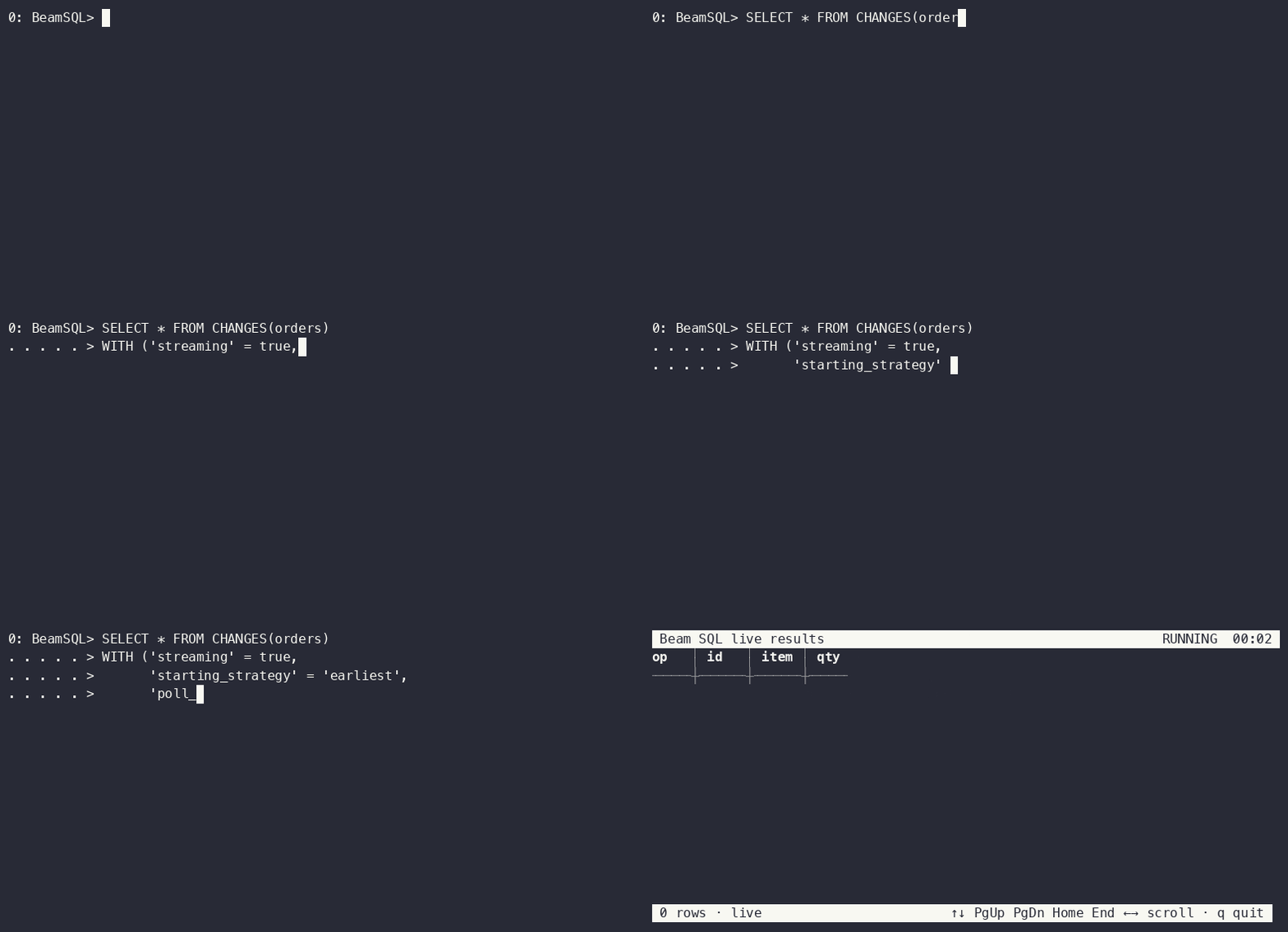
// The sink creates the table on first write, with `id` as its primary key.
static final Schema CHANGE =
    Schema.builder()
        .addInt64Field("id")
        .addStringField("item")
        .addInt32Field("qty")
        .addStringField("op") // the change type
        .addInt64Field("seq") // the sequence number
        .build();

static Row change(long id, String item, int qty, String op, long seq) {
  return Row.withSchema(CHANGE).addValues(id, item, qty, op, seq).build();
}

static void applyChanges(Map<String, Object> catalog, Row... changes) {
  Map<String, Object> write = new HashMap<>(catalog);
  write.put("table", "shop.orders");
  write.put("mode", "merge-on-read");
  write.put("equality_columns", List.of("id"));
  write.put("change_type_column", "op");
  write.put("sequence_number_column", "seq");

  Pipeline p = Pipeline.create();
  p.apply(Create.of(Arrays.asList(changes)).withRowSchema(CHANGE))
      .apply(Managed.write(Managed.ICEBERG).withConfig(write));
  p.run().waitUntilFinish();
}
# The sink creates the table on first write, with `id` as its primary key.
def change(id, item, qty, op, seq):
return beam.Row(id=id, item=item, qty=qty, op=op, seq=seq)
def apply_changes(*changes):
with beam.Pipeline() as p:
_ = (
p
| beam.Create(changes)
| beam.managed.Write(beam.managed.ICEBERG, config={
**catalog,
"table": "shop.orders",
"mode": "merge-on-read",
"equality_columns": ["id"],
"change_type_column": "op",
"sequence_number_column": "seq",
}))Each change record carries two metadata values:
- the record’s change type (
op) - the record’s sequence number (
seq), which goes up with each change to the same key. Both halves of an update (UPDATE_BEFOREandUPDATE_AFTER) share one.
// Snapshot 1: three new orders
applyChanges(catalog,
    change(1, "apple", 3, "INSERT", 1),
    change(2, "pear", 5, "INSERT", 1),
    change(3, "plum", 2, "INSERT", 1));
# Snapshot 1: three new orders
apply_changes(
change(1, "apple", 3, "INSERT", 1),
change(2, "pear", 5, "INSERT", 1),
change(3, "plum", 2, "INSERT", 1))# snapshot_1.yaml: three new orders. The sink creates the table, with `id` as its key.
pipeline:
type: chain
transforms:
- type: Create
config:
elements:
- {id: 1, item: apple, qty: 3, op: INSERT, seq: 1}
- {id: 2, item: pear, qty: 5, op: INSERT, seq: 1}
- {id: 3, item: plum, qty: 2, op: INSERT, seq: 1}
- type: WriteToIceberg
config:
table: shop.orders
catalog_name: quickstart
catalog_properties: {type: hadoop, warehouse: "file:///tmp/beam-iceberg-cdc-quickstart"}
mode: merge-on-read
equality_columns: [id]
change_type_column: op
sequence_number_column: seq3. Keep a table in sync (streaming)
Now open a second shell. Here, we’ll run a streaming pipeline that continuously observes the
original orders table and applies its changes to a downstream table.
Connect to the catalog, and create a second table, orders_mirror.
CREATE CATALOG quickstart TYPE 'iceberg'
PROPERTIES (
  'type' = 'hadoop',
  'warehouse' = 'file:///tmp/beam-iceberg-cdc-quickstart'
);
USE DATABASE quickstart.shop;

CREATE EXTERNAL TABLE orders_mirror (
  id BIGINT PRIMARY KEY NOT ENFORCED,
  item VARCHAR,
  qty INTEGER
)
TYPE 'iceberg';
Continuously stream changes from orders into orders_mirror. On the read side, select two
Iceberg metadata columns by name:
Now write a second program. Here, we’ll run a streaming pipeline that continuously observes the
original orders table and applies its changes to a downstream table, orders_mirror.
Now open a second terminal. Here, we’ll run a streaming pipeline that continuously observes the
original orders table and applies its changes to a downstream table, orders_mirror.
On the read side, request two Iceberg metadata columns with include_metadata_columns:
- the change type (
_change_type) - the snapshot sequence number (
_commit_snapshot_sequence_number)
On the write side, point change_type_column at the type. You don’t need to set
sequence_number_column, because it already defaults to _commit_snapshot_sequence_number. The
sink drops both columns before it writes.
Streaming writes need a commit window, which you set with triggering_frequency_seconds. Streaming
reads need a polling interval, which you set with poll_interval_seconds (defaults to 60s). A
streaming read starts at the latest snapshot by default, so set starting_strategy to earliest
to also apply the changes made before the pipeline started.
INSERT INTO orders_mirror
WITH ('mode' = 'merge-on-read',
      'change_type_column' = '_change_type',
      'triggering_frequency_seconds' = 1)
SELECT *, _change_type, _commit_snapshot_sequence_number
FROM CHANGES(orders)
WITH ('streaming' = true,
      'starting_strategy' = 'earliest',
'poll_interval_seconds' = 1);Map<String, Object> read = new HashMap<>(catalog);
read.put("table", "shop.orders");
read.put("include_metadata_columns", List.of("_change_type", "_commit_snapshot_sequence_number"));
read.put("streaming", true);
read.put("starting_strategy", "earliest");
read.put("poll_interval_seconds", 1);
Map<String, Object> write = new HashMap<>(catalog);
write.put("table", "shop.orders_mirror");
write.put("mode", "merge-on-read");
write.put("equality_columns", List.of("id"));
write.put("change_type_column", "_change_type");
write.put("triggering_frequency_seconds", 1);
Pipeline p = Pipeline.create();
p.apply(Managed.read(Managed.ICEBERG_CDC).withConfig(read))
.getSinglePCollection()
.apply(Managed.write(Managed.ICEBERG).withConfig(write));
p.run().waitUntilFinish(); // runs until you stop it
from apache_beam.options.pipeline_options import PipelineOptions

with beam.Pipeline(options=PipelineOptions(streaming=True, runner="PrismRunner")) as p:
  _ = (
      p
      | beam.managed.Read(beam.managed.ICEBERG_CDC, config={
          **catalog,
          "table": "shop.orders",
          "include_metadata_columns": [
              "_change_type", "_commit_snapshot_sequence_number"],
          "streaming": True,
          "starting_strategy": "earliest",
          "poll_interval_seconds": 1,
      })
      | beam.managed.Write(beam.managed.ICEBERG, config={
          **catalog,
          "table": "shop.orders_mirror",
          "mode": "merge-on-read",
          "equality_columns": ["id"],
          "change_type_column": "_change_type",
          "triggering_frequency_seconds": 1,
      }))
# mirror.yaml
pipeline:
type: chain
transforms:
- type: ReadFromIcebergCDC
config:
table: shop.orders
catalog_name: quickstart
catalog_properties: {type: hadoop, warehouse: "file:///tmp/beam-iceberg-cdc-quickstart"}
include_metadata_columns: [_change_type, _commit_snapshot_sequence_number]
streaming: true
starting_strategy: earliest
poll_interval_seconds: 1
- type: WriteToIceberg
config:
table: shop.orders_mirror
catalog_name: quickstart
catalog_properties: {type: hadoop, warehouse: "file:///tmp/beam-iceberg-cdc-quickstart"}
mode: merge-on-read
equality_columns: [id]
change_type_column: _change_type
triggering_frequency_seconds: 1
options:
streaming: true
runner: PrismRunnerWithin a few seconds, the mirror catches up on this first round of changes. Leave the streaming
pipeline running and open a new program to check the contents of orders_mirror:
Within 15 seconds or so, the mirror catches up on this first round of changes. Leave the streaming
pipeline running and open a new terminal to check the contents of orders_mirror:
static void printTable(Map<String, Object> catalog, String table) {
  Map<String, Object> read = new HashMap<>(catalog);
  read.put("table", table);

  Pipeline p = Pipeline.create();
  p.apply(Managed.read(Managed.ICEBERG).withConfig(read))
      .getSinglePCollection()
      .apply(LogElements.info());
  p.run().waitUntilFinish();
}

printTable(catalog, "shop.orders_mirror");
def print_table(table):
with beam.Pipeline() as p:
_ = (
p
| beam.managed.Read(beam.managed.ICEBERG, config={**catalog, "table": table})
| beam.Map(print))
print_table("shop.orders_mirror")# check.yaml. Run it with:
# python -m apache_beam.yaml.main --yaml_pipeline_file=check.yaml \
# --jinja_variables='{"table": "shop.orders_mirror"}'
pipeline:
type: chain
transforms:
- type: ReadFromIceberg
config:
table: {{table}}
catalog_name: quickstart
catalog_properties: {type: hadoop, warehouse: "file:///tmp/beam-iceberg-cdc-quickstart"}
- type: LogForTestingcheck.yaml takes the table as a Jinja variable.
LogForTesting logs each row as a line like {"id": 1, "item": "apple", "qty": 3}, among Beam’s
other log output.
You should see these rows, in any order:
| id | item | qty |
|---|---|---|
| 1 | apple | 3 |
| 2 | pear | 5 |
| 3 | plum | 2 |
4. Write some changes and watch them arrive
Open a third shell. Connect it to the catalog, and check that both tables are there:
CREATE CATALOG quickstart TYPE 'iceberg'
PROPERTIES (
  'type' = 'hadoop',
  'warehouse' = 'file:///tmp/beam-iceberg-cdc-quickstart'
);
USE DATABASE quickstart.shop;
SHOW TABLES;
Now change orders in two rounds, one snapshot each. Each change record carries two metadata
values:
- the record’s change type (
op) - the record’s sequence number (
seq), which goes up with each change to the same key. Both halves of an update (UPDATE_BEFOREandUPDATE_AFTER) share one.
-- Snapshot 1: three new orders
INSERT INTO orders
WITH (
  'mode' = 'merge-on-read',
  'change_type_column' = 'op',
  'sequence_number_column' = 'seq')
  (id, item, qty, op, seq)
VALUES (1, 'apple', 3, 'INSERT', 1),
       (2, 'pear', 5, 'INSERT', 1),
       (3, 'plum', 2, 'INSERT', 1);
Soon you’ll see three inserts show up in the live view in the first shell, in any order:
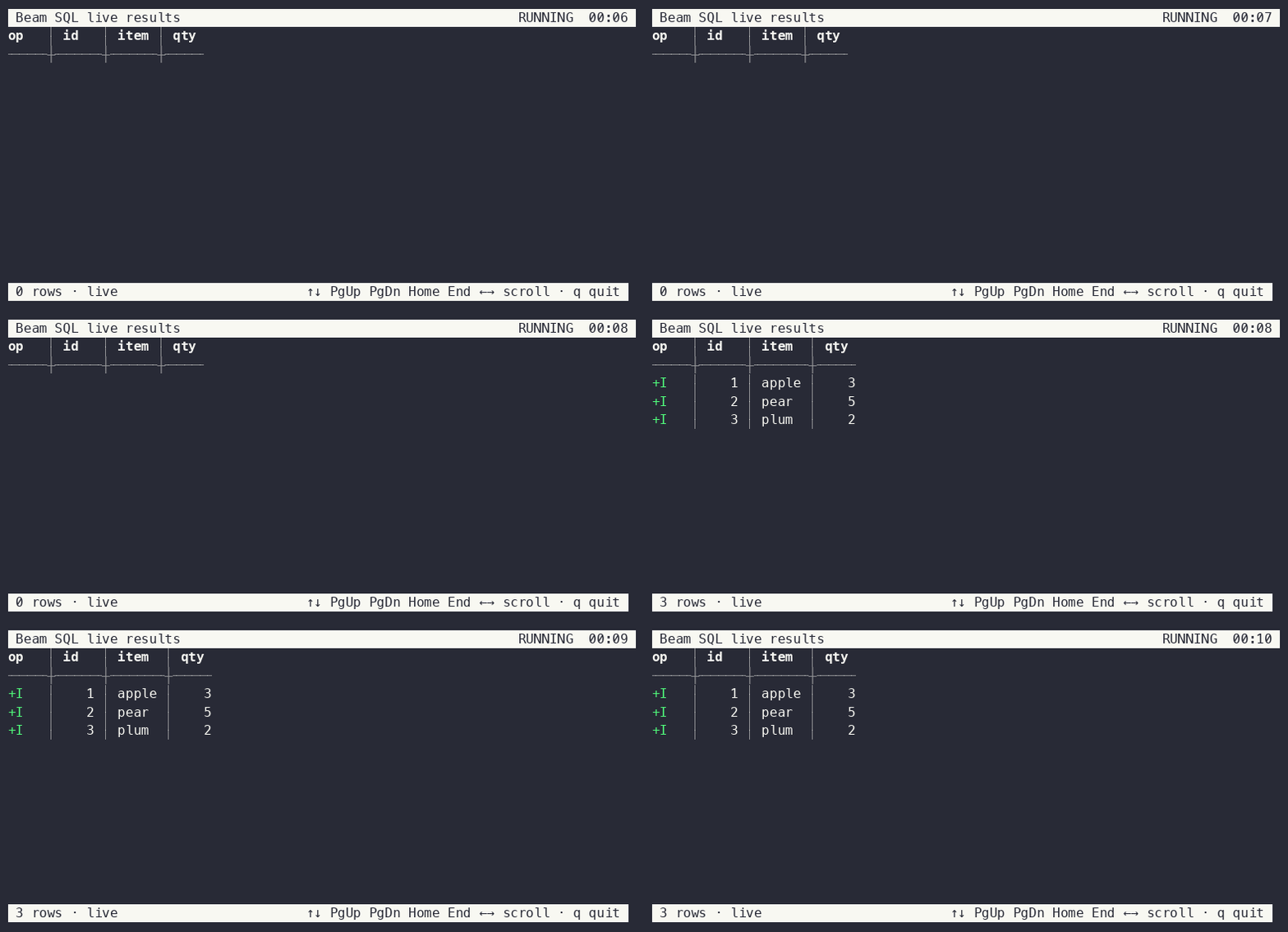
Query both tables. Each should hold the same three orders.
SELECT * FROM orders;
SELECT * FROM orders_mirror;
Now make a second round of changes:
Now make a second round of changes from another program, using the helpers from step 2:
Now make a second round of changes from another script, using the helpers from step 2:
Now make a second round of changes from another terminal:
-- Snapshot 2: change order 1, delete order 2, add order 4
INSERT INTO orders
WITH (
  'mode' = 'merge-on-read',
  'change_type_column' = 'op',
  'sequence_number_column' = 'seq')
  (id, item, qty, op, seq)
VALUES (1, 'apple', 3, 'UPDATE_BEFORE', 2),
       (1, 'apple', 4, 'UPDATE_AFTER', 2),
       (2, 'pear', 5, 'DELETE', 2),
       (4, 'kiwi', 1, 'INSERT', 2);
// Snapshot 2: change order 1, delete order 2, add order 4
applyChanges(catalog,
change(1, "apple", 3, "UPDATE_BEFORE", 2),
change(1, "apple", 4, "UPDATE_AFTER", 2),
change(2, "pear", 5, "DELETE", 2),
change(4, "kiwi", 1, "INSERT", 2));# Snapshot 2: change order 1, delete order 2, add order 4
apply_changes(
change(1, "apple", 3, "UPDATE_BEFORE", 2),
change(1, "apple", 4, "UPDATE_AFTER", 2),
change(2, "pear", 5, "DELETE", 2),
change(4, "kiwi", 1, "INSERT", 2))# snapshot_2.yaml: change order 1, delete order 2, add order 4
pipeline:
type: chain
transforms:
- type: Create
config:
elements:
- {id: 1, item: apple, qty: 3, op: UPDATE_BEFORE, seq: 2}
- {id: 1, item: apple, qty: 4, op: UPDATE_AFTER, seq: 2}
- {id: 2, item: pear, qty: 5, op: DELETE, seq: 2}
- {id: 4, item: kiwi, qty: 1, op: INSERT, seq: 2}
- type: WriteToIceberg
config:
table: shop.orders
catalog_name: quickstart
catalog_properties: {type: hadoop, warehouse: "file:///tmp/beam-iceberg-cdc-quickstart"}
mode: merge-on-read
equality_columns: [id]
change_type_column: op
sequence_number_column: seqYou’ll see four new changes stream into the live view:
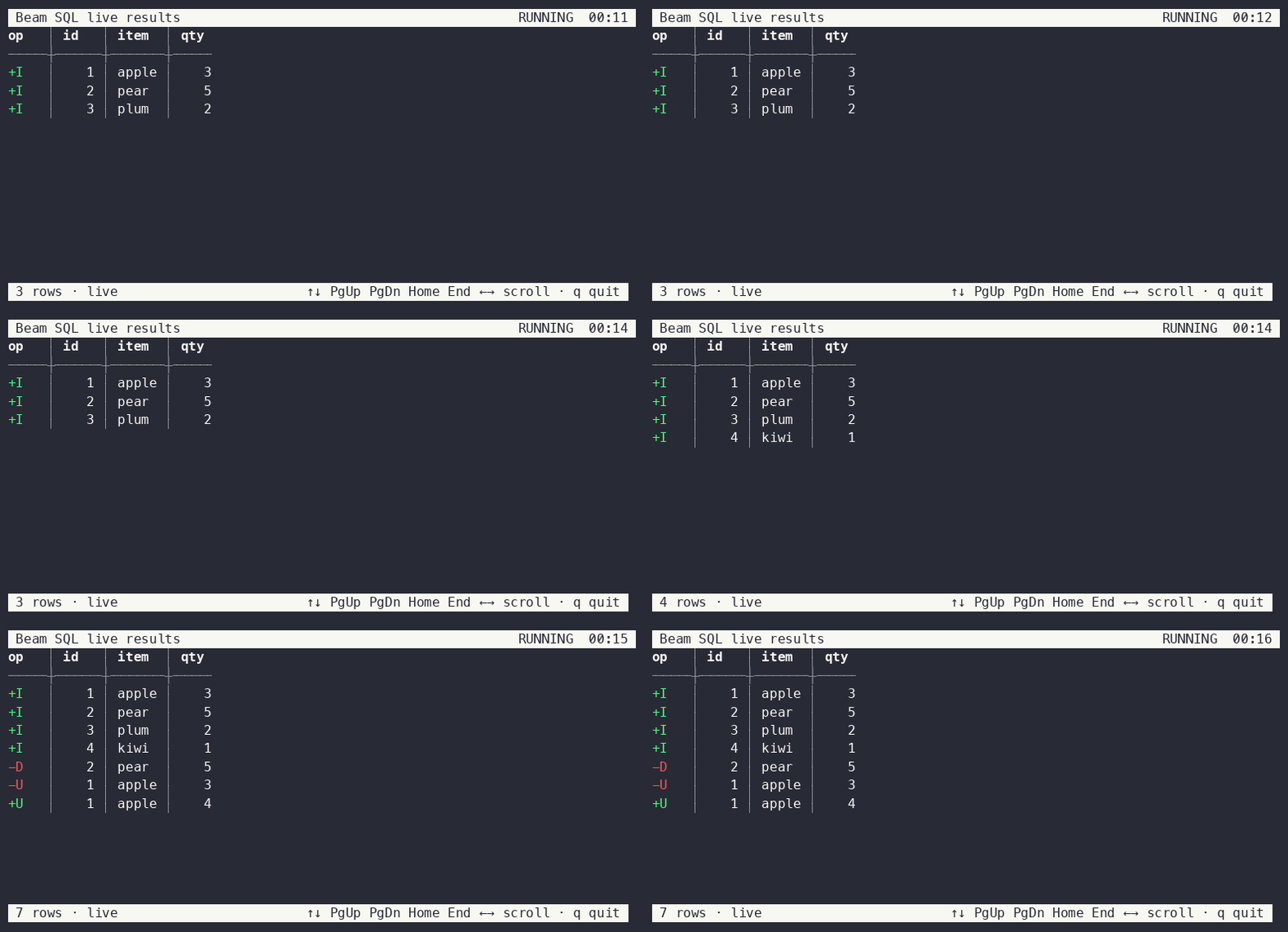
Query both tables again to verify the changes were applied correctly:
SELECT * FROM orders;
SELECT * FROM orders_mirror;
Run the check from step 3 again to verify the changes were applied correctly to orders and its downstream mirror:
printTable(catalog, "shop.orders");
printTable(catalog, "shop.orders_mirror");print_table("shop.orders")
print_table("shop.orders_mirror")# Run check.yaml for each table:
# python -m apache_beam.yaml.main --yaml_pipeline_file=check.yaml \
# --jinja_variables='{"table": "shop.orders"}'
# python -m apache_beam.yaml.main --yaml_pipeline_file=check.yaml \
# --jinja_variables='{"table": "shop.orders_mirror"}'orders_mirror should now match orders, in any order:
| id | item | qty |
|---|---|---|
| 1 | apple | 4 |
| 3 | plum | 2 |
| 4 | kiwi | 1 |
When you’re done, press q in the first shell to close the live view, and stop the streaming
INSERT in the second shell with Ctrl+C.
When you’re done, stop the streaming pipeline with Ctrl+C.
Run it on Dataflow
When you’re ready to move off your machine, point the catalog at a REST catalog such as Lakehouse, and run on Dataflow.
Start the shell with the Dataflow runner. In this quickstart, do this for the second shell:
./beam-sql.sh --version 2.79.0 --runner dataflow --io iceberg
Within the shell, set the following pipeline options:
Add these dependencies. The Iceberg ones are for Lakehouse:
<dependency>
  <groupId>org.apache.beam</groupId>
  <artifactId>beam-runners-google-cloud-dataflow-java</artifactId>
  <version>2.78.0</version>
  <scope>runtime</scope>
</dependency>
<dependency>
  <groupId>org.apache.iceberg</groupId>
  <artifactId>iceberg-gcp</artifactId>
  <version>1.12.0</version>
  <scope>runtime</scope>
</dependency>
<dependency>
  <groupId>org.apache.iceberg</groupId>
  <artifactId>iceberg-gcp-bundle</artifactId>
  <version>1.12.0</version>
  <scope>runtime</scope>
</dependency>
dependencies {
runtimeOnly("org.apache.beam:beam-runners-google-cloud-dataflow-java:2.78.0")
runtimeOnly("org.apache.iceberg:iceberg-gcp:1.12.0")
runtimeOnly("org.apache.iceberg:iceberg-gcp-bundle:1.12.0")
}Set the following pipeline options. In this quickstart, do this for the mirror pipeline:
SET runner = DataflowRunner;
SET project = 'my-project';
SET region = 'us-central1';
SET tempLocation = 'gs://my-bucket/tmp';
Pipeline p =
Pipeline.create(
PipelineOptionsFactory.fromArgs(
"--runner=DataflowRunner",
"--project=my-project",
"--region=us-central1",
"--tempLocation=gs://my-bucket/tmp")
.create());# pip install 'apache-beam[gcp]>=2.79.0'
from apache_beam.options.pipeline_options import PipelineOptions
options = PipelineOptions(
runner="DataflowRunner",
project="my-project",
region="us-central1",
temp_location="gs://my-bucket/tmp",
streaming=True)
with beam.Pipeline(options=options) as p:
...# pip install 'apache-beam[gcp,yaml]>=2.79.0'
# In mirror.yaml, replace the options block with:
options:
streaming: true
runner: DataflowRunner
project: my-project
region: us-central1
temp_location: gs://my-bucket/tmpOn Dataflow, a streaming job keeps running after the shell or program exits. Cancel it from the
Dataflow console, or with gcloud dataflow jobs cancel.
What to know before production
- Your source table needs a primary key on
NOT NULLcolumns, which Iceberg calls identifier fields. If it doesn’t have one, add it in a Beam SQL shell:ALTER TABLE orders ADD PRIMARY KEY (id) NOT ENFORCED. - You may also stream changes from sources other than Iceberg, as long as:
- Every row has a change type and a sequence number. As a key’s sequence numbers go up, its event times should never go down. Both halves of an update share a sequence number.
- Every update comes with its
UPDATE_BEFORE, andINSERTonly shows up for keys the target doesn’t have yet. Otherwise the target ends up with duplicates. If your source only sends after-images, or might resend inserts, please setupserttotrue. - If the target is partitioned on non-key columns,
UPDATE_BEFOREandDELETErows need to carry the row’s old values in those partition columns. Otherwise the old row never gets deleted.
- The source skips expired snapshots, so keep your snapshot expiration long enough to survive potential outages in your upstream lakehouse.
- If your use-case requires you to restart streaming jobs, give the sink a fixed
sink_id. Each run gets a random one by default. A job restarted with the samesink_idandtriggering_frequency_secondswill be able to recognize and skip already-committed windows. This is helpful when your restart may overlap with a previous run. - A running pipeline doesn’t handle schema changes (e.g. an added column). To change the schema, stop the pipeline, make the same change to both tables, and start it again.
- If a record arrives after its commit window has closed, it will be considered late and routed to the
sink’s
dead_letteroutput instead of the table. Watch thedeadLetterRecordscounter.
Options
The most useful options for the source:
| Option | Default | What it does |
|---|---|---|
streaming | false | Keep polling for new snapshots. |
poll_interval_seconds | 60 | How often to poll, in streaming. |
starting_strategy | earliest in batch, latest in streaming | Where to start reading. latest includes the current snapshot. Can’t be combined with from_snapshot or from_timestamp. |
from_snapshot / from_timestamp | none | Start at this snapshot ID, which must exist, or at the first snapshot committed at or after this time (epoch milliseconds). If there is none yet, a batch read returns no rows and a streaming read waits for one. |
to_snapshot / to_timestamp | none | Stop at this snapshot ID or time (inclusive). |
include_metadata_columns | none | Add _change_type, _commit_snapshot_sequence_number or _commit_snapshot_id to each row (v3 tables have more). When feeding the CDC sink, include only the first two. In SQL, select them by name instead. |
filter, keep, drop | none | Filter rows and pick columns. Key columns can’t be dropped. |
watermark_column | none | Use this column as event time instead of the commit time. Leave it unset when feeding the CDC sink. |
And for the sink, when mode is merge-on-read:
| Option | Default | What it does |
|---|---|---|
equality_columns | the table’s identifier fields | The primary key. Required when the sink creates the table. |
sequence_number_column | _commit_snapshot_sequence_number | Non-null BIGINT column that goes up with each change to a key. |
change_type_column | none | Non-null string column holding the change type. Always set it. |
change_type_map | none | Maps source change type values to INSERT, UPDATE_BEFORE, UPDATE_AFTER or DELETE. |
upsert | false | Treat inserts and updates as upserts, ignoring UPDATE_BEFORE rows. Partition columns must be key columns. |
triggering_frequency_seconds | required in streaming | Length of each commit window. |
sink_id | random per run | Identifies the sink’s commits so restarts skip what’s done. |
token_heartbeat_seconds | off | In streaming, commit an empty snapshot this often while idle, so the latest stamp survives snapshot expiry. |
num_shards | 16 | Write parallelism per table. Each window writes up to this many data files, and as many delete files, per partition it touches. |
shards_per_partition | num_shards | The most shards one partition may use. Lower it for fewer files per partition. Below num_shards, partition columns must be key columns. |
allowed_lateness_seconds | 21600 | How late a record can be and still reach dead_letter, rather than being dropped. |
snapshot_properties | none | Extra properties to add to each commit’s snapshot summary. Keys starting with beam.cdc. are reserved. |
sorter_memory_mb | 100 | Memory for the sort before writing, before it spills to disk. |
error_handling | fail the bundle | {"output": "errors"} sends invalid records (an unknown change type, or a null key or sequence number) to an output named errors. Without it, a bad record fails its bundle, which stalls a streaming pipeline. SQL has no errors output yet. |
Learn more
- Stream changes between Iceberg tables with Apache Beam
- Iceberg CDC sink design doc
- Apache Iceberg I/O connector
- IcebergIO Javadoc
- Managed I/O reference: Iceberg CDC read and Iceberg write
Last updated on 2026/11/24
Have you found everything you were looking for?
Was it all useful and clear? Is there anything that you would like to change? Let us know!